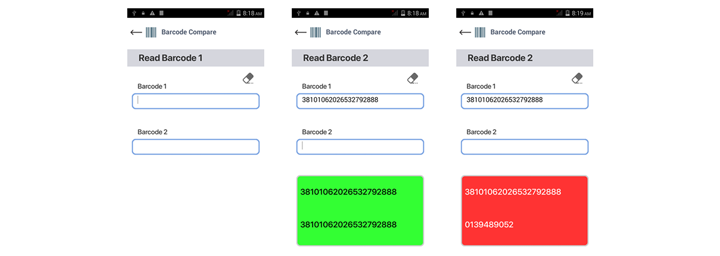
Barcode Comparison with Newland: Three Solutions for Reliable Verification

Barcodes play a central role in daily operations across retail, healthcare, manufacturing, logistics, and many other industries. They support product identification, inventory accuracy, traceability, and operational speed, often triggering a wider chain of actions with a single scan. But organizations don’t operate on a single barcode alone. Don’t let a mismatch interrupt your workflow or lead to costly mistakes.
Barcode comparison is crucial for verifying that product barcodes align with expected data. This is important in situations where mismatches can result in costly errors, such as shipping the wrong item or mislabeling. By detecting discrepancies early, barcode comparison helps prevent small mistakes from escalating into major operational issues.
Different industries require tailored barcode comparison hardware, which is why Newland offers three device options.
For immediate confirmations, there are the BS80 Piranha II, a simple handheld scanner, and the WD2 Wearable Scanner from our Nwear range. For more detailed comparison results, the MT37 Baiji mobile computer provides a more flexible user interface.
Now, let's take a closer look at each of these devices!
No time to read right now? Check our PDF.
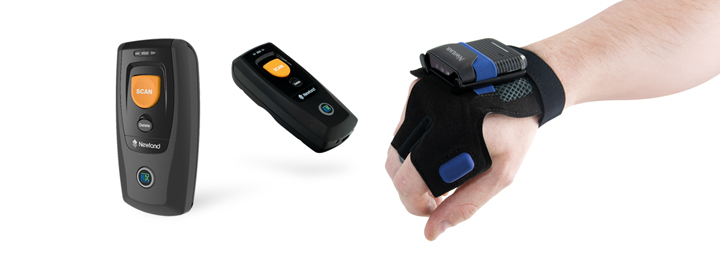
BS80 Piranha II and WD2 Wearable Scanner: Pocket-Sized and Hands-Free Barcode Comparison
The BS80 Piranha II is a compact handheld scanner that fits easily in your pocket, providing excellent performance for scanning 1D and 2D barcodes.
The WD2 Wearable Scanner offers comfortable, hands-free scanning with its Integrated Trigger Strap, which eliminates the time wasted putting the device away while still delivering outstanding performance on 1D and 2D barcodes.
Both devices can function as standalone barcode comparison tools thanks to their Advanced Scripting feature. This allows users to customize their behavior and run local comparison workflows without a Bluetooth connection.
The script generated through Advanced Scripting enables the devices to perform comparisons. When the first code is scanned, the script stores it in memory until the second code is scanned, at which point it compares the two. The scanners provide immediate audible or visual notifications if a match is found. Additionally, the BS80 Piranha II features timestamping to log scan dates and times, creating a practical audit trail for applications in healthcare, warehouse verification, and quality control checks.
Industry examples:
Healthcare: The BS80 Piranha II and WD2 Wearable Scanner scan a patient’s wristband barcode and compare it with the medication label or treatment sheet. If they don’t match, it alerts the operator before administration.
Retail: The scanners verify product placement by comparing shelf labels and product barcodes, aiding in stock checks, shelf audits, and restocking.
Warehouse: The Piranha and WD2 verify that the box contents match the barcode on the outer carton or label, ensuring the correct items were packed or stored.
Quality Control: The BS80 Piranha II compares two codes during inspection and records the exact time, aiding in documentation of inspections, exceptions, or corrective actions.
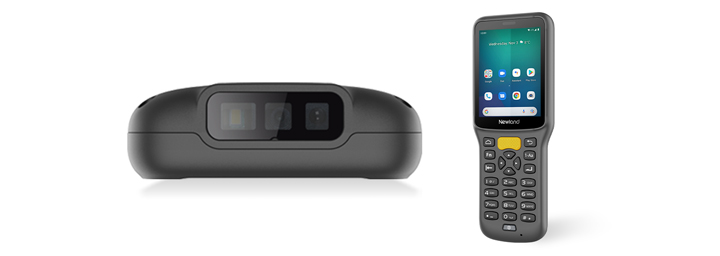
MT37 Baiji: On-Screen Barcode Comparison
The MT37 Baiji is a lightweight and ergonomic mobile computer specifically designed for scanning 1D and 2D barcodes, even when damaged or of poor quality. It features pre-licensed DCAPP software for easy customization and has a 2.83-inch screen that provides visual feedback.
The DCAPP software can be optimized to improve usability and support specific customer workflows. In a barcode comparison workflow, the Baiji can compare two scanned barcodes and provide notifications via LED lights, audible alerts, and visual updates on its screen, including confirmation and error messages. The MT37 Baiji also offers haptic feedback through vibrations.
This flexibility in notifications allows for a more tailored application and enhances the user experience to better meet operational needs.
Industry examples:
Healthcare: The MT37 Baiji scans a patient's wristband barcode and compares it with a medication barcode. If they match, a green confirmation appears; if not, a warning or error message appears. This visual confirmation helps operators ensure accurate results before proceeding.
Retail: The Baiji checks if a product's barcode matches the shelf label to ensure items are displayed correctly. A visual “match” or “no match” result helps streamline shelf audits.
Warehouse: The mobile computer compares the outer carton barcode with the product's barcode or a picking list label, enabling operators to verify the accuracy of the items quickly.
Receiving and Dispatch: The MT37 checks supplier labels against internal item labels during dispatch to ensure the outgoing label matches the order reference. If a mismatch occurs, the operator can stop the process and correct the item, reducing handling errors and enhancing workflow control.
Inventory control: The MT37 Baiji compares barcode labels during stock checks, such as verifying bin labels against item labels. The on-screen result helps confirm if an item is in its correct location,
Quality control: The Baiji enhances quality-control workflows by clearly displaying barcode verifications for operators. It allows printed labels to be compared to reference samples, with DCAPP indicating a clear match or mismatch, making the process more user-friendly than a scanner-only solution.
Service and Field Checks: The mobile computer compares device labels or asset tags to reference records and displays the results visually, helping operators in solo work or under challenging lighting conditions.
Barcode comparison helps businesses reduce errors and improve accuracy across industries. The ideal solution varies depending on the application, environment, and the type of comparison required. Understanding each product's strengths allows companies to choose the best barcode comparison solution to support daily operations and avoid costly mistakes.